


Trivia Crush
4.77.62K Reviews
App Specs
- Version
- 1.6.8
- Updated On
- License
- Free
- Downloads
- 1,000,000+
- Developer
- CanaryDroid
- Categories
- Trivia
- Platform
- Android, iOS
Screenshots

 Analysis by AppCompare
I often find trivia games at their best when they fit naturally into the small gaps of a day: a few minutes before dinner, a quiet stretch on the sofa, or a turn passed around while people wait. Trivia Crush aims for that casual appeal, pairing questions with a puzzle-like sense of progress. I think it suits households that enjoy friendly quiz sessions, though shared use works best when everyone understands whose game session they are playing and what they want from it.
A quick game that can bring people together
In a shared-device setting, the simplest way to enjoy a trivia game is to take turns answering and let the conversation matter as much as the score. With this one, the question-and-level format gives a group something concrete to react to: someone knows the answer, someone makes a guess, and the next challenge keeps the round moving. I would treat it as a light living-room activity rather than a formal team game, especially when players have different levels of trivia experience.
A realistic use is a short round while a meal is being prepared. One person can play, while others call out guesses, then pass the phone along when the session ends. That keeps the game easy to fit around household routines without assuming there is a dedicated family mode or shared profile. If a competitive mood starts to make the experience less fun, setting a simple house rule—such as celebrating correct answers rather than tracking who wins—can keep the focus on the questions.
Keep device sharing simple
Before handing a phone to someone else, I would make a clear distinction between taking a turn and changing anything associated with the device or game account. A shared screen does not automatically mean shared progress, and I would avoid letting another player make purchases or alter settings unless the device owner is comfortable with that. This is ordinary good practice for any game on a family phone, not a special feature of this one.
The purchase range runs from under a dollar to nearly a hundred dollars per item, so I would be especially deliberate about purchase boundaries on a device used by children or guests. The game is free to download, but that does not mean every optional purchase is free. I recommend checking the device’s purchase protections before a child plays independently, and explaining that extra items are not required simply because the game presents them as tempting options.
Coordination matters when several people use the same device. Agree on whether the phone is being passed around for a few questions or handed over for a longer personal session; that small decision can prevent accidental changes and arguments over progress. If each person wants a separate record of their play, a shared device may not be the most convenient arrangement. I would choose a game with clearly separated player profiles when preserving individual histories is the priority.
Age context and household trust
The game is rated for Everyone, which makes it broadly suitable for a general audience, but age ratings are only one part of a parent’s decision. I would still stay nearby the first time a younger player tries it, not because the rating raises a particular concern, but because it is useful to see how they handle questions, ads, and purchase prompts. That first look also helps a parent decide whether the pace and challenge feel right for that child.
Worth Reading Before You Choose

EA SPORTS FC Mobile 26 Is a Bigger Football Game, but It Takes Time

Flipboard Shows What News Apps Must Do Beyond the Feed

Switching to Android Auto Means Rethinking Your Driving Routine

Google Calendar Makes a Crowded Week Easier to Manage

Ludo King Makes the Most of the Minutes Between Plans

Baby Panda World Brings Quick Play to Modern Phones, but Its Game Library Feels Busy
For older players, the appeal is less about supervision and more about matching expectations. This is a casual trivia game, not a carefully structured course or a dependable way to study a subject. I would use it to spark conversation or test general knowledge, then turn to a dedicated learning resource if accuracy, depth, or a planned curriculum is what matters. In a household, that distinction helps everyone enjoy the game without expecting it to teach in the same way as a textbook or lesson app.
Where it fits among trivia games
Compared with a plain quiz app that simply presents question after question, this game’s puzzle framing gives answers a visible sense of forward motion. That can make a brief session feel more engaging than a list of questions, especially for players who like unlocking the next challenge. On the other hand, someone who wants a quiet, no-frills quiz or a structured set of subject-specific questions may prefer a conventional trivia app. The best choice depends on whether you want playful progression or a more direct test of knowledge.
I would also choose a different option for a group that needs a host-led party quiz, custom questions, or clearly managed teams. Trivia Crush is better approached as an individual mobile game that can be enjoyed socially by taking turns and discussing answers. That distinction is useful: it avoids expecting the app to organize a household quiz night when the fun can instead come from people gathering around one person’s play.
What Makes Trivia Crush Stand Out?
First off, Trivia Crush isn't your average trivia game. It combines the thrill of traditional trivia with a unique twist. Imagine a game where each correct answer not only boosts your score but also helps you crush obstacles in your path. It’s like a puzzle and trivia game had a fun, colorful baby!
The interface is super user-friendly. Even if you’ve never picked up a trivia game before, you’ll find yourself navigating through the app like a pro. The bright colors and engaging animations make every session feel like a mini party in your pocket.
Diving Into the Gameplay
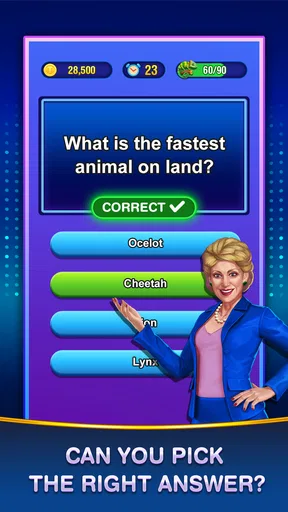
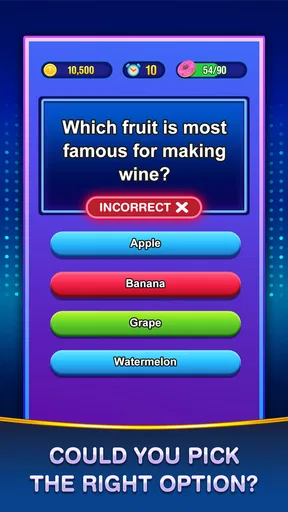
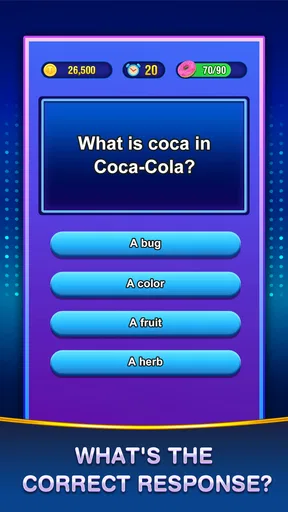
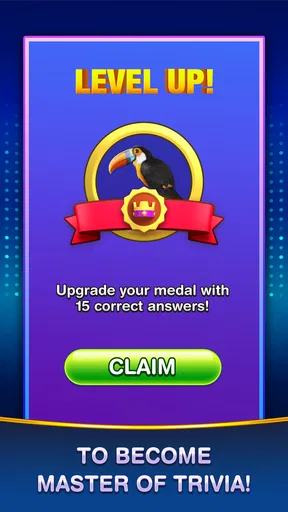
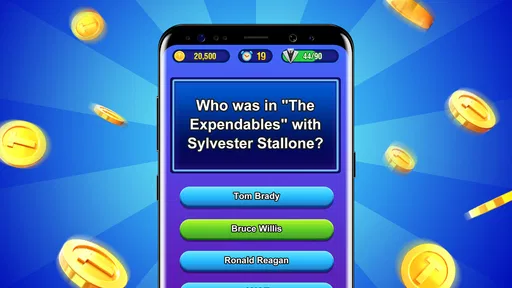
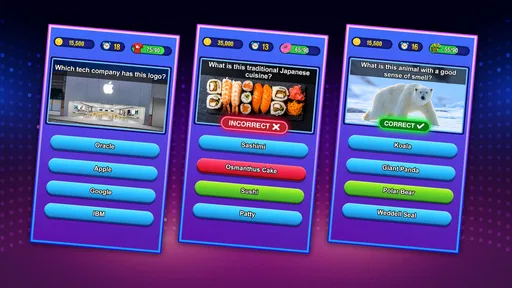
Gameplay in Trivia Crush is straightforward yet thoroughly entertaining. You tackle a series of questions across various categories, from history to pop culture. Each correct answer helps you "crush" through levels, revealing more challenges and, of course, more trivia.
The questions range from easy peasy to mind-boggling. I found myself scratching my head more than once, but that's part of the charm. There’s a satisfying mix of difficulty levels, keeping both trivia newbies and seasoned veterans engaged.
One of the coolest features is the multiplayer mode. You can challenge friends or random players worldwide, bringing a competitive edge into the mix. Trust me, nothing feels better than outsmarting your buddy who claims to "know it all."
Why You'll Keep Coming Back
The app does a fantastic job of keeping you hooked with its daily challenges and rewards. I particularly enjoyed the daily trivia quests, which offer a chance to win coins and power-ups. It's a neat incentive to log in every day and keep those brain cells active.
Moreover, Trivia Crush provides an ever-growing question database. This means you’re unlikely to encounter the same question twice, keeping the content fresh and exciting. Plus, with regular updates, there's always something new to look forward to.
Room for Improvement
While Trivia Crush is mostly a smash hit, I did notice a couple of areas that could use a little polish. For starters, the app occasionally displays ads between levels. While I understand the need for these, a slightly less frequent appearance would enhance the flow of the game.
Additionally, the in-app purchase options, while not necessary to enjoy the game, can be a bit tempting. Some players might feel the urge to buy extra lives or power-ups, which could potentially detract from the challenge.
Final Thoughts on Trivia Crush
All in all, Trivia Crush is a delightful addition to the trivia game genre. It’s perfect for quick play sessions during your lunch break or when you’re lounging on the couch, looking to give your brain a workout. The blend of trivia and puzzle elements creates a dynamic experience that's hard to put down.
Whether you're a trivia aficionado or just looking for a fun way to pass the time, Trivia Crush deserves a spot on your device. So, what are you waiting for? Dive in, start crushing those questions, and see how you stack up against the rest of the world!
What to expect before installing
CanaryDroid’s trivia game has a 4.7 average from around 158,000 ratings, and it has passed a million installs. Those figures suggest a broad audience, but they do not tell me whether its style will suit you. I would focus instead on the combination of quick questions, visual progress, and competitive play: that mix is the reason to choose it over a bare-bones quiz, and also the reason it may feel busier than a simple question deck.
It is free to play, with optional purchases priced from $0.99 to $99.99 per item. I would start without spending and treat coins, lives, or power-ups as conveniences rather than necessities. If a question is difficult, taking a guess and learning from the result is often more satisfying than using a boost immediately; saving help for a later moment can preserve the challenge. This is a practical way to keep the game feeling like a quiz instead of a sequence of purchase decisions.
The listed release date is July 29, 2021, and the current version is 1.6.8. It supports Android 4.0 and later, which makes it accessible on a wide range of Android devices. For iOS availability, check the relevant app store for your device before planning a household setup. As with any game, device compatibility is only the first check: make sure the screen is comfortable for the person playing, particularly if the phone will be passed between people.
Small habits that make sessions better
For solo play, I find it helpful to decide in advance whether a session is a quick break or an attempt to make steady progress. Daily challenges can make the game feel rewarding, but they can also turn a casual pastime into a routine if you feel obliged to return every day. I would use them when they add a pleasant prompt, not as a reason to interrupt other plans. A game should fit the spare minutes you have, rather than creating a new chore.
For a group, take turns reading and answering only if everyone is comfortable sharing the screen and the game’s pace. Some people enjoy thinking aloud; others prefer to answer privately and compare afterward. Letting each person choose their approach keeps a casual quiz from becoming a test in front of the room. It also makes the game easier for mixed-age groups, where a younger player may need more time or an adult may want to explain an unfamiliar subject.
Question variety is a strength, but broad categories inevitably mean not every question will match every player’s interests or knowledge. A missed answer can reflect a gap in familiarity rather than a lack of intelligence, and a correct answer does not make the game a reliable measure of expertise. I would use the changing subjects as conversation starters: ask why someone knew an answer, or look up a topic afterward if it catches the group’s interest. That is a better use of a casual quiz than treating its score as a serious ranking.
Who will enjoy it—and who may not
I would recommend it to players who like short rounds, general-knowledge questions, visible level progression, and the option to compete. It also works for someone easing into trivia games, because the interface is approachable and the range of question difficulty gives beginners room to participate. The game can be a good choice for a commute break or a shared evening when people want something more interactive than scrolling but less involved than setting up a full board game.
I would skip it if you dislike interruptions between levels, prefer a completely purchase-free experience, or want a controlled learning path with verified subject coverage. The ad breaks can interrupt momentum, and optional extras may be distracting if you are trying to avoid spending. Likewise, a player who wants an offline paper quiz, a no-screen family activity, or a structured multiplayer party format will be better served by a different kind of game.
How I would make the household choice
For a household, I would install it on the device belonging to the person who is happy to manage the game, then agree on turn-taking and purchase rules before passing it around. The Everyone rating is reassuring as a broad age classification, but it does not replace a parent’s own judgement about ads, spending, screen time, or whether a child is ready to play without help. A brief first session together answers those practical questions more reliably than assuming every family member will use the app in the same way.
My household verdict is that Trivia Crush works best as an easy-to-start, individually played quiz that can become social when people gather around. Its puzzle-like progression makes it livelier than a plain quiz list, while its ads and tempting extras are real trade-offs to keep in mind. If your household can set simple boundaries and enjoys answering general-knowledge questions together, I think it is worth trying; if separate profiles, a formal host-led format, or uninterrupted play are essential, I would choose another option.
Pros
- Engaging and challenging questions.
- Smooth and intuitive user interface.
- Regular updates with new content.
- Multiplayer mode enhances competition.
- Offline play available for convenience.
Cons
- Ads can be frequent and intrusive.
- Limited rewards in free version.
- In-app purchases can be pricey.
- Occasional connectivity issues.
- Repetitive questions over time.
FAQs for Trivia Crush
What is Trivia Crush and how does it work?
Trivia Crush is an engaging quiz game that challenges your knowledge across various topics. Players answer multiple-choice questions to earn points. The game offers a mix of timed challenges and levels, each with increasing difficulty. As you progress, you unlock new categories and earn rewards, keeping the gameplay exciting and dynamic.
Is Trivia Crush available for both Android and iOS?
Yes, Trivia Crush is available on both Android and iOS platforms. You can download it from the Google Play Store or the Apple App Store. The game is optimized for a wide range of devices, ensuring a smooth gaming experience whether you're using a phone or a tablet.
Are there any in-app purchases in Trivia Crush?
Trivia Crush offers optional in-app purchases. These may include additional lives, hints, or exclusive question packs. While the game is free to download and play, these purchases can enhance the gameplay experience, particularly if you want to progress faster or tackle more challenging levels.
Can I play Trivia Crush offline?
Trivia Crush requires an internet connection to download questions and sync progress. However, once questions are downloaded, you can play some levels offline. To ensure the best experience and access to all features, it's recommended to play while connected to the internet.
Does Trivia Crush offer multiplayer options?
Yes, Trivia Crush includes a multiplayer mode where you can challenge friends or other players worldwide. You can compete in real-time quizzes, climb the leaderboard, and show off your trivia prowess. This feature adds a social element, making the game more engaging and competitive.


